Let's Learn: Terraform
About Terraform. It's components, workflow, expressions, state data, functions, workspaces and more.


On this page (18)
- What is Terraform?
- Core Components
- Terraform Code Components
- Object Types
- Terraform Syntax
- Workflow
- Terrafrom variable
- Terraform Data Types
- Terrafrom Locals
- Terraform Output
- Terraform State Data
- Terraform Providers
- Terraform Block Syntax
- Terraform Looping Constructs
- Terraform Inbuilt Functions
- Terraform FOR Expression
- Terraform Workspaces
- Additional Resources
What is Terraform? #
- Terraform is an Infrastructure Automation tool.
- It is Open Source and Vendor Agnostic.
- It is a Single binary compiled from Go.
- It follows Declarative syntax.
- It uses HashiCorp Configuration Language(HCL) or JSON.
- Deployment is push based.
Core Components #
- Executable
- Can be downloaded from official Terraform webpage.
- Configuration files
- Provider plugins
- State data
Terraform Code Components #
- It can be divided into 3 parts:
- Inputs - Terraform gets input by leveraging variable(s).
- Outputs - The data in the output block is printed to screen.
- Logic - Your IaC.
Object Types #
- Providers
- Resources
- Data sources
Terraform Syntax #
-
HashiCorp uses Block syntax
    block_type "label" "name_of_label" {
        key = "value"

        nested_block{
            key = "value"
        }
    }
Workflow #
-
terraform init-
Looks for configuration files in current working directory and examines them. If they need any provider plugins, it will search in public Terraform registry unless any specified location provided.
-
Terraform needs to store data of configuration somewhere as part of init process. A state data file will be created in current directory unless any specified backed it created or pointed.
-
When init completes, infrastructure is ready to be deployed.
-
-
terraform plan- This step is optional.
- It will look current configuration i.e. contents of state data and determine the difference. Then it draws a plan for Target environment to match the desired configuration.
-
terraform apply- It will build our desired configuration in Target environment.
-
terraform destroy- It will bring down the infrastructure of desired configuration in Target environment.
Terrafrom variable #
-
Variable declaration
variable "name_of_variable" {} -
Variable definition
variable "name_of_variable" { type = value description = "value" default = "value" sensitive = true or false }- Example
    variable "device_name" {
        type = string
        description = "Provides the Device name"
        default = "computer"
        sensitive = true
}
- Example
-
type - Data type
-
Description - Context for the user. It will be displayed when the user encountered an error.
-
default - This value will be considered if no value has been provided.
-
sensitive - If it is 'true', data will not be printed in logs or terminal. If 'false', vice versa. Default sticks to 'false'.
-
Referencing a variable
var.<name_of_variable>- Example
var.device_name
- Example
-
Hierarchy
-
For variable(s) data or value, Terraform designed a precedence chart.
-
Precedence
Environment variable(s) > .tfvars (or) .tfvars.json > .auto.tfvars (or) .auto.tfvars.json > -var-file flag > - var flag > CLI
-
Terraform Data Types #
-
Primitive
- string
- number
- integer
- decimal
- boolean
- true
- false
-
Collection
-
list
- Enclosed with [ ]
- Example
[1,2,3] ["Mobile", "Computer", "Laptop"] - Variable reference
- Example
variable "list_of_device_types"{ type = list(string) description = "Provides list of device types" default = ["Mobile","Computer","Laptop"] }- Syntax
var.<name_of_variable>[<element_number>]- Example
- var.list_of_device_types[0]
- For accessing first element in list. Likewise for other elements accessing.
- Example
-
set
- Same syntax as list and do not hold duplicates.
-
map
- Enclosed with { }
- Example
{ India = "Delhi" USA = "Washigton" Canada = "Ottawa" } - Variable reference
- Example
variable "capitals"{ type = map(string) description = "Provides captials for countries." default = { India = "Delhi" USA = "Washigton" Canada = "Ottawa" } } - Syntax
var.<name_of_variable>.<name_of_the_key> or var.<name_of_the_variable>["name_of_the_key"] - Example
- var.capitals.India or var.capitals["India"]
- For accessing first element in map. Likewise for other elements accessing.
- Example
-
Note: Should hold same type of data.
-
-
Structural
- type
- object
Terrafrom Locals #
-
Values provides in locals are computed inside the configuration and cannot be passed as parameter during runtime.
-
Syntax
locals{ key : "value" } -
Example
locals{ name_of_the_company = "ThunderWonder" } -
Referencing locals
- syntax
local.<name_of_the_variable> - Example
local.name_of_the_company
- syntax
Terraform Output #
-
Output values are extracting information from Terraform.
-
Output is printed to terminal screen at the end of configuration execution.
-
It also exposes values when a configuration is placed inside a module.
-
Syntax
output "name_of_the_variable"{ value = output_to_be_exposed description = string sensitive = true | false } -
Example
    output "selected_device"{
        value = var.list_of_device_types[0]
        description = "Prints selected device(s).
    }
Tip: If you want to validate your Terraform code. Type terraform validate.
- First run
terraform init. terraform validatewill check for your syntax and logic.- It will not guarantee for successful deployment.
Terraform State Data #
-
It stored in JSON format
- Important: It should not be modified. To work with State Data, we can use State commands.
-
It contains Resource Mapping and metadata.
-
It can be stored in:
- Local (Default, by name terraform.tfstate)
- Remote (Basically Cloud Providers)
- Ex: AWS, Azure, Terraform Cloud, etc.
-
State Commands
terraform state list- To list all state resources.
terraform state show <ADDRESS>- To show a specific resource.
- Example :
terraform state show module web_app_s3.aws_s3_bucket.web_bucket
terraform state mv SOURCE DESTINATION- To move an item in state file.
terraform state rm <ADDRESS>- To remove an item in state file.
- Example:
terraform state rm module web_app_s3.aws_s3_bucket.web_bucket
terraform state pull- Output current state to stdout.
terraform state push- Update remote state from local.
Terraform Providers #
- It contains Public & Private registries.
- Registries types are:
- Official
- Maintained by HashiCorp.
- Verified
- Maintained by Third Party and verified by HashiCorp.
- Community
- Maintained by Individuals in Community and not verified.
- Official
- Providers are Open Source and written in Go Lang.
- It has Resources and Data Sources.
- Providers are versioned.
Terraform Block Syntax #
- It is used for configuring General Settings of Terraform Configuration like,
- Version
- Backend Settings for State Data
- Required Provider Plugins
- Provider metadata
- Experimental features
- Syntax
terraform{ requried_providers { provider_name = { source = "provider's_address" version = "version_expression" } } }- Example
   terraform{
    requried_providers {
        aws = {
            source = "hashicorp/aws"
            version = "=3.0"
        }
    }
}
- Example
Terraform Looping Constructs #
-
count
- Takes integer and used as iterator.
indexis used to keep track of count.- Example
resource "aws_instance" "web_app_server"{ count = 3 tags = { Name = "web-app-Instance-${count.index} } } - Referencing
- Referring single instance
<resource_type><name_of_the_variable>[element].<attribute> - Referring all the instances
<resource_type><name_of_the_variable>[*].<attribute>
- Referring single instance
-
for_each
- used to for iterating Map or set/list.
- Example
resource "aws_s3_bucket_object" "website_content"{ for_each = { app_logo = "app-logo.png" main_page = "index.html" } key = each.value source = "${each.value}" } - Referencing
<resource_type><name_of_the_variable>[key].<attribute>
-
Dynamic block
- used to for iterating Map or set/list.
Terraform Inbuilt Functions #
-
Numeric Functions
-
String Functions
-
Collection Functions
-
Encoding Functions
-
Filesystem Functions
-
Date and Time Functions
-
Hash & Crypto Functions
-
IP Network Functions
-
Type Conversion Functions
-
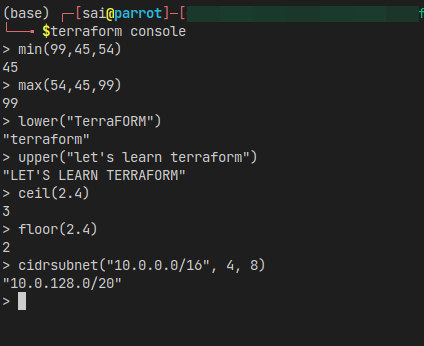
You can play around with in-built functions. Type
terraform consoleand test it out. -
Example
-
Check out Terraform Functions documentation for respective function methods, and it's usage.
-
Note: Terraform does not support for User-defined functions.
Terraform FOR Expression #
-
Input type:
- List, Set, Tuple, Map or, Object.
-
Result type:
- Tuple or Object
-
Filtering is possible by leveraging if statement.
-
Examples
-
Tuple
-
Syntax
[for item in items : tuple_element] -
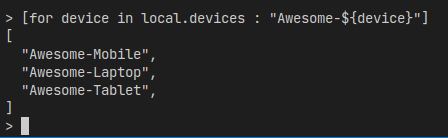
Example
locals{ devices = ["Mobile", "Laptop", "Tablet"] } [for device in local.devices : "Awesome-${device}"] -
Result
-
-
Object
-
Syntax
{for key, value in map : obj_key => obj_value} -
Example
locals{ type_of_device{ Mobile = "compact" Laptop = "productive" } } {for key, value in local.type_of_device : key => upper(value)} -
Result

-
-
Terraform Workspaces #
- Terraform creates a initial workspace for us called default.
- It cannot be deleted.
- We can create workspace(s) per our requirement and management.
- Management like
- State management
- Variable values
- Credential management, etc.
- Management like
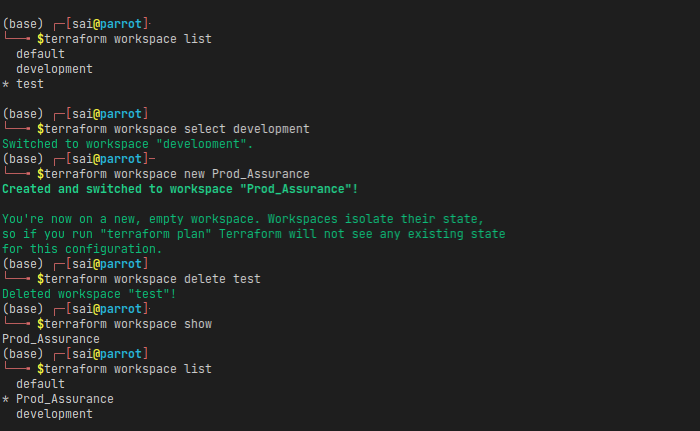
- workspace commands
-
terraform workspace list- To show all existing workspaces. -
terraform workspace select <workspace_name>- To switch to desired workspace. -
terraform workspace new <workspace_name>- To create & switch to new workspace. -
terraform workspace delete <workspace_name>- To delete existing workspace. -
terraform workspace show- To print current working workspace. -
Example
-
Additional Resources #
- ** Wanna try or start your Terraform practice ?**
- Start your Terraform practice today. For head start or reference check out my Terraform practice at GitHub. Feel free to fork and enhance your Terraform practice.
- Interested to learn more about variables like validations, limitations? Do check How to Use Terraform Variables.
I am an SRE. I'm a continuous learner of DevOps, AWS, Terraform. Furthermore, I'm interested in OpenSource and writing Technical blogs.
Get new posts in your inbox.
Spotted a typo or want to improve this post? Edit on GitHub →