Demystifying API Response in Go
How to handle API response as text, HTML or JSON using GoLang.


On this page (3)
In this tutorial, we will go through a simple Request/Response flow where we will write a GO program to handle a request from the API.
Let's dive into the code directly!!
Let's try to understand what is needed to make this program functional :
import (
	"fmt"
	"net/http"
)First, we need to import two packages http and fmt from go standard library.
http package has ResponseWriter - this is used to send the data and Request - this is for reading the request that is sent by the API.
Next, we create a handler function with two arguments - ResponseWriter and Request and use
fmt package FPrintf function to add a response to the writer object.
func handleMe(w http.ResponseWriter, r *http.Request) {
	fmt.Fprintf(w, "We got this!")
}http.HandleFunc("/", handleMe)
HandleFunc function from the http package is used to route the URL path to the handler function - handleMe
Lastly, we are using the ListenAndServe function from http to start and listen to the server on a port. The two arguments here are the port to bind and the handler that is usually nil, which means to use DefaultServeMux. HandleFunc takes two arguments, one for the path and another for the function to be called on that path.
http.HandleFunc("/", handleMe)
http.ListenAndServe(":8181", nil)Let's see how the complete program looks like
package main

import (
	"fmt"
	"net/http"
)

func handleMe(w http.ResponseWriter, r *http.Request) {
	fmt.Fprintf(w, "We got this!")
}

func main() {
	http.HandleFunc("/", handleMe)
	http.ListenAndServe(":8181", nil)
}
Let's run the program
go run main.go
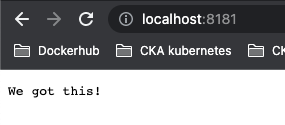
curl localhost:8181
We got this!You can also see the same from the Web UI
Another handler path #
You can extend this by adding another handler for a separate path
func handleFollow(w http.ResponseWriter, r *http.Request) {
	fmt.Fprintf(w, "Follow Kubesimplify")
}and add this to main() -> http.HandleFunc("/follow", handleFollow)
The complete program now becomes
package main

import (
	"fmt"
	"net/http"
)

func handleMe(w http.ResponseWriter, r *http.Request) {
	fmt.Fprintf(w, "We got this!")
}

func handleFollow(w http.ResponseWriter, r *http.Request) {
	fmt.Fprintf(w, "Follow Kubesimplify")
}
func main() {
	http.HandleFunc("/", handleMe)
	http.HandleFunc("/follow", handleFollow)
	http.ListenAndServe(":8181", nil)
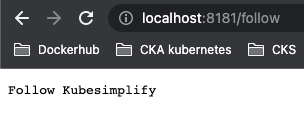
}When you run it, your code will be able to handle localhost:8181 and localhost:8181/follow
JSON Response #
Now most of the times when we are interacting with the API's we deal with JSON objects, so when we hit a particular endpoint, we get a JSON response back. In order to send JSON object as a response we need to first create a struct.
type Kubesimplify struct {
	Website string `json:"website"`
	Twitter string `json:"twitter"`
	Sponsor string `json:"sponsor"`
	Founder string `json:"founder"`
}It is basically a new datatype that we define and can use in our handler function, the key in the JSON is mentioned after the data_type of each field, these are called field tags. Let's create the JSON handler function.
func handleJson(w http.ResponseWriter, r *http.Request) {
	w.Header().Set("Content-Type", "application/json")
	kubesimplify := Kubesimplify{
		Website: "kubesimplify.com",
		Twitter: "@kubesimplify",
		Sponsor: "kubesimplify.com/sponsor",
		Founder: "Saiyam Pathak",
	}
	json.NewEncoder(w).Encode(kubesimplify)
}
Here we construct a new instance of type Struct called kubesimplify and encode that using the NewEncoder function from the json package that get the JSON encoding of any types and then writes it to the ResponseWriter object which in this case is w.
The complete program now becomes
package main

import (
	"encoding/json"
	"fmt"
	"net/http"
)

func handleMe(w http.ResponseWriter, r *http.Request) {
	fmt.Fprintf(w, "We got this!")
}

func handleFollow(w http.ResponseWriter, r *http.Request) {
	fmt.Fprintf(w, "Follow Kubesimplify")
}

type Kubesimplify struct {
	Website string `json:"website"`
	Twitter string `json:"twitter"`
	Sponsor string `json:"sponsor"`
	Founder string `json:"founder"`
}

func handleJson(w http.ResponseWriter, r *http.Request) {
	w.Header().Set("Content-Type", "application/json")
	kubesimplify := Kubesimplify{
		Website: "kubesimplify.com",
		Twitter: "@kubesimplify",
		Sponsor: "kubesimplify.com/sponsor",
		Founder: "Saiyam Pathak",
	}
	json.NewEncoder(w).Encode(kubesimplify)
}
func main() {
	http.HandleFunc("/", handleMe)
	http.HandleFunc("/follow", handleFollow)
	http.HandleFunc("/json", handleJson)
	http.ListenAndServe(":8181", nil)

}
When you run this program go run main.go and do curl localhost:8181/json, it will give the JSON response back.
curl localhost:8181/json
{"website":"kubesimplify.com","twitter":"@kubesimplify","sponsor":"kubesimplify.com/sponsor","founder":"Saiyam Pathak"}From the Web

HTML response #
The way json response was sent, you can use html/template package and form template you can use the ParseFiles to load the HTML.
So first let's create the Html file
<html>
<body style="font-family: 'Poppins', sans-serif; font-weight: bold; line-height: 2rem; font-size:1.3rem; color: white; text-align: center; padding: 15px; background-color: #1B2731">
        <h3>Website : {{.Website}}</h3>
        <h3>Twitter : {{.Twitter}}</h3>
        <h3>Sponsor : {{.Sponsor}}</h3>
        <h3>Founder : {{.Founder}}</h3>
    </body>
</html>
Now, create another handler function where the Content-Type will be text/html instead of application/json, use the ParseFile function from the html/template package to parse the demo.html that you created above. The Execute() function takes
the writer w and applies the parsed template to the data object.
func handleHtml(w http.ResponseWriter, r *http.Request) {
	w.Header().Set("Content-Type", "text/html; charset=utf-8")
	t, err := template.ParseFiles("demo.html")
	if err != nil {
		fmt.Fprintf(w, "Unable to load the file")
	}

	kubesimplify := Kubesimplify{
		Website: "kubesimplify.com",
		Twitter: "@kubesimplify",
		Sponsor: "kubesimplify.com/sponsor",
		Founder: "Saiyam Pathak",
	}
	t.Execute(w, kubesimplify)
}The complete program now becomes
package main

import (
	"encoding/json"
	"fmt"
	"html/template"
	"net/http"
)

func handleMe(w http.ResponseWriter, r *http.Request) {
	fmt.Fprintf(w, "We got this!")
}

func handleFollow(w http.ResponseWriter, r *http.Request) {
	fmt.Fprintf(w, "Follow Kubesimplify")
}

type Kubesimplify struct {
	Website string `json:"website"`
	Twitter string `json:"twitter"`
	Sponsor string `json:"sponsor"`
	Founder string `json:"founder"`
}

func handleJson(w http.ResponseWriter, r *http.Request) {
	w.Header().Set("Content-Type", "application/json")
	kubesimplify := Kubesimplify{
		Website: "kubesimplify.com",
		Twitter: "@kubesimplify",
		Sponsor: "kubesimplify.com/sponsor",
		Founder: "Saiyam Pathak",
	}
	json.NewEncoder(w).Encode(kubesimplify)
}
func handleHtml(w http.ResponseWriter, r *http.Request) {
	w.Header().Set("Content-Type", "text/html; charset=utf-8")
	t, err := template.ParseFiles("demo.html")
	if err != nil {
		fmt.Fprintf(w, "Unable to load the file")
	}

	kubesimplify := Kubesimplify{
		Website: "kubesimplify.com",
		Twitter: "@kubesimplify",
		Sponsor: "kubesimplify.com/sponsor",
		Founder: "Saiyam Pathak",
	}
	t.Execute(w, kubesimplify)
}

func main() {
	http.HandleFunc("/", handleMe)
	http.HandleFunc("/follow", handleFollow)
	http.HandleFunc("/json", handleJson)
	http.HandleFunc("/html", handleHtml)
	http.ListenAndServe(":8181", nil)

}
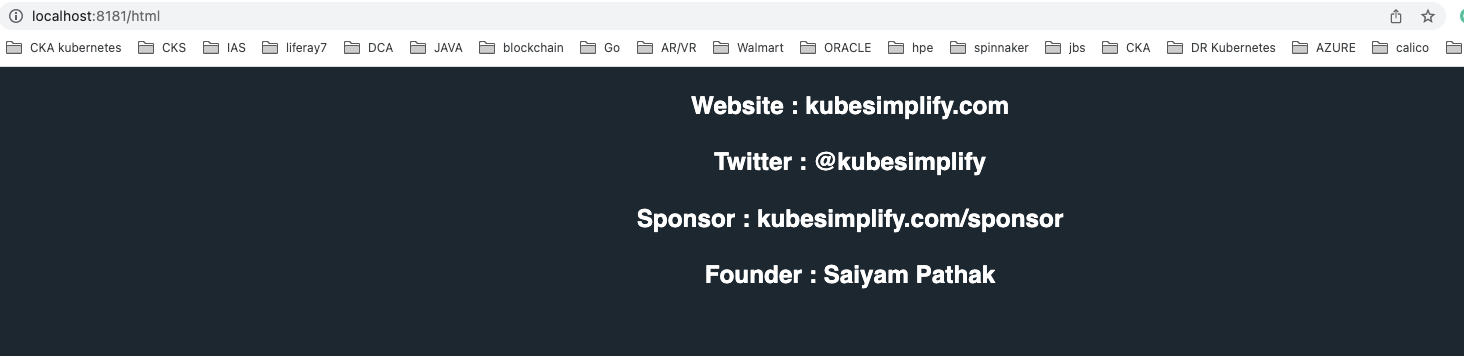
When you run this program go run main.go and do curl localhost:8181/html, it will give the HTML response back.
curl localhost:8181/html
<html>
<body style="font-family: 'Poppins', sans-serif; font-weight: bold; line-height: 2rem; font-size:1.3rem; color: white; text-align: center; padding: 15px; background-color: #1B2731">
        <h3>Website : kubesimplify.com</h3>
        <h3>Twitter : @kubesimplify</h3>
        <h3>Sponsor : kubesimplify.com/sponsor</h3>
        <h3>Founder : Saiyam Pathak</h3>
    </body>
</html>From the Web
Hope that explains, how to create a simple API and handle the response for a request as plain text, JSON and HTML!
For more such articles - Follow Kubesimplify
Saiyam is working as Head of DevRel at vCluster Labs. He is the founder of Kubesimplify, focusing on simplifying cloud-native & AI infrastructure. He is KubeCon Co-chair and has worked on many facets of Kubernetes, including machine learning platforms, scaling, multi-cloud, & managed Kubernetes services. When not coding, Saiyam contributes to the community by writing blogs and organizing local meetups for Kubernetes and CNCF. He is also a CNCF TAG OpsRes Chair & can be reached on Twitter @saiyampathak.
Get new posts in your inbox.
Spotted a typo or want to improve this post? Edit on GitHub →